


























Error-Level Diagnosis · Verified After Every Fix · 35,000+ ASINs in Care
Amazon Catalog Management Services — Diagnosed, Fixed, Verified
Suppressed listings, broken variations, failing flat files, GTIN and brand errors that keep bouncing back — each one is named, fixed through the correct Amazon route, and verified live after the fix. That is what our Amazon catalog management services exist to end. Then the alarm gets wired, so the same error doesn't quietly return.
- The error gets named before anything gets billed
- Every fix re-verified live — and dated
- The change log outlasts the project
The discipline
What Do Amazon Catalog Management Services Actually Cover?
The catalog is the data layer underneath every listing you sell — the attributes, identifiers, variation relationships, categories and feeds that Amazon's systems read before any shopper reads a word of your copy. Catalog management is keeping that layer true: repair when it breaks, maintenance so it stays fixed.
What it is not, is the listing editor. Most catalog work fails precisely here, because the visible page is only the last step of a longer chain — and errors live in the joints between the steps. A value entered correctly can still fail validation and never publish. A child ASIN can stay live while its variation relationship is wrong. A spreadsheet can report "processed" while individual SKUs return warnings nobody reads. That is why our diagnosis starts at the error level, never at the listing level.
Suppressions, contribution conflicts, feed failures, broken families, duplicates. Every repair ends in a live re-check with a date on it — never in a submission receipt and a prayer.
Named-owner change control, monitoring that alarms on unauthorized edits, scheduled health sweeps, onboarding discipline for new ASINs. Amazon catalog maintenance is an operating rhythm, not a rescue habit.
One estate boundary, stated before you buy anything: the catalog is the data layer, not the persuasion layer. What shoppers read — titles, bullets, imagery, brand story — belongs to our product listing service; what the data feeds — indexing and rank — is the doctrine our Amazon SEO services run on. Catalog management holds the layer those two stand on, which is why a weak catalog quietly taxes both of them.
The diagnosis shelf
The Error Library: 10 Catalog Errors We Fix Every Week
Ten error families account for almost every broken catalog we open. Each is filed the way our desk files it: the cause, the route that actually fixes it, and the check that proves the fix stuck. Find yours below — or bring the symptoms and we'll name it.
Stranded & Suppressed Listings
Cause · Missing attributes or policy flags leave a live ASIN search-ineligible — invisible and unsellable.
Fix route · Cause-by-cause correction, then the reinstatement lane with the evidence attached.
Verified by · The ASIN back in live search — dated.
Variation-Theme Errors
Cause · Theme, attributes and records disagree, so the family never forms — or splits overnight.
Fix route · The family rebuilt against the variation theme the category actually permits.
Verified by · Children displaying and pooling again.
Brand & Attribute Conflicts
Cause · Contributions at war over titles, brand names and core attribute values.
Fix route · The correct door — Brand Registry for registered brands, Seller Support otherwise. They are not the same door.
Verified by · What the detail page actually publishes.
GTIN & Brand-Approval Blocks
Cause · Identifier conflicts with no GS1 evidence on file, or brand approval never granted in the first place.
Fix route · GS1 evidence prepared — or a GTIN exemption filed where the product genuinely qualifies.
Verified by · ASIN creation cleared.
Image & Media Rule Rejections
Cause · Dimension, background or main-image rules failed quietly at upload time.
Fix route · Corrected assets through our photo desk, re-fed and re-checked.
Verified by · Processing-report acceptance.
Browse-Node & Product-Type Errors
Cause · The wrong item-type keyword files the product under the wrong attribute schema entirely.
Fix route · Reclassification through template — plus an approval case where the node is gated.
Verified by · Filter and index behavior on the live page.
Contribution Conflicts
Cause · Your edit saves cleanly; the page keeps publishing someone else's data anyway.
Fix route · Contribution versus published data compared; the correct authority engaged.
Verified by · The detail page holding your edit.
Duplicate & Merged ASINs
Cause · Two records for one product — reviews split, rank split, stock confused.
Fix route · Identifiers compared, the merge case prepared, and the creating process fixed so it stops happening.
Verified by · One surviving record.
Bulk-Upload & Feed Failures
Cause · Template errors rejected rows nobody knew had failed — the report went unread.
Fix route · Validation before submission, small batches first, the processing report read at SKU level.
Verified by · Zero-error acceptance.
Backend Corruption & Stranded Inventory
Cause · Invisible fields hold wrong values; the data and the stock disagree and both look fine.
Fix route · Field-level repair plus fulfillment-data reconciliation, checked from both sides.
Verified by · Data and stock agreeing.
Your error not on this shelf? That is exactly what the free catalog audit is for: bring the symptoms, leave with the name of the error — named before anything gets billed, as always.
The method
How Do Catalog Fixes Actually Get Made?
One rail, six stations — every catalog fix travels all of them, whether it's one suppressed ASIN or a ten-thousand-row template. The rail is what separates a repair from a re-submission.
Two stations carry the honesty most catalog shops skip. At Fix: any change that can touch more than a handful of SKUs is tested on a small batch before it touches your catalog. At Validate: failed rows are corrected and resubmitted — never re-blasted until something sticks. The flat-file processing report is read line by line, because that's where Amazon tells you the truth one SKU at a time.
This is also why our fixes don't boomerang. A fix that ends at "submitted" ends in a support queue; a fix that ends at a dated, live re-check ends the problem. And when the blocker sits on Amazon's side of the wall, the case is opened through the correct lane — the route matters as much as the request — and you watch its status change in the same log, not in a weekly email.
The economics of families
What Do Product Variations Do to Reviews and Rank?
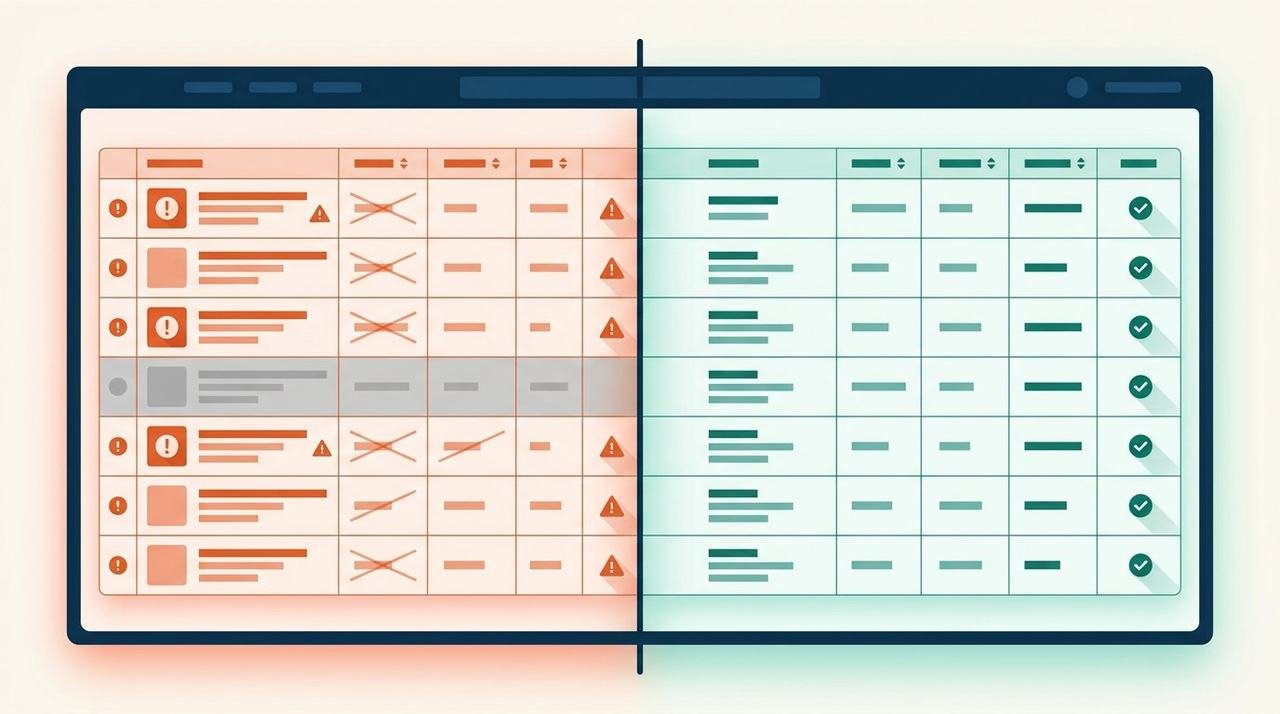
More than any other structure in your catalog — because a variation family decides whether your reviews and rank pool into one strong listing or scatter across several weak ones. Drag the divider: same products, two very different outcomes.
When a family helps: the shopper sees every color and size on one page instead of bouncing across listings; children share the visibility the strongest sibling earns; reviews pool where the category's sharing rules allow it. When it hurts: children listed separately split their own rank and reviews into thirds; families built on a theme the category doesn't permit quietly break apart — and families built to pool reviews from unrelated products are abuse that detonates on Amazon's schedule, not yours. Which is why our line is the unfashionable one: we do not promise review aggregation where Amazon's current sharing rules no longer allow it. We structure families for what the policy actually permits, so the win survives the next audit sweep instead of becoming its target.
The border between this work and rank work is the variation-architecture workstream inside our Amazon SEO services — the catalog desk makes the family true; the SEO desk makes it visible.
Honest timing
How Fast Can a Suppression Be Resolved, Honestly?
Faster than waiting, slower than the gig sites promise — and anyone who quotes you one flat number for every suppression hasn't diagnosed yours yet. Here is the clock as it actually runs, with the part we own separated from the part Amazon owns.
Any new error or suppression is triaged and named within one business day of surfacing. That is the one timing commitment we print, because it's the only stretch of the clock entirely in our hands.
Missing attributes, image rules, template mismatches: causes on your side of the wall usually clear the moment the corrected record is accepted — the fast lane, dated in the log when it's verified.
Policy, brand and compliance cases move at Amazon's pace, which no agency controls. What we own: airtight evidence attached the first time, the case chased daily, and every status change dated in your log.
The alternative economy is the fire-and-forget fix: cheap, instant, and back next month — because nobody asked why the error happened, so the feed, the template or the hijacking contribution that caused it is still there, re-breaking the same record. You pay twice for those: once for the fix, once for the amnesia. The slower-looking route — name the cause, fix through the right lane, verify, wire the alarm — is the one that only has to be paid for once.
The bridge nobody builds
What Do Catalog Errors Do to Your Ads and Rankings?
Quiet damage, every day they sit unfixed — because every discovery system Amazon runs reads the catalog before it reads your bids or your keywords. Three leaks we find in almost every broken catalog that walks in.
A suppressed ASIN is index-zero: every term it ranked for is gone the same hour, and no amount of keyword work outruns a page Amazon won't serve. This is why verified indexing — the doctrine behind our Amazon SEO services — starts with a healthy catalog, not a keyword list.
Ads keep serving impressions toward pages shoppers can't buy from — delivery continues, conversion flatlines, and the bids get blamed for a catalog problem. Our advertising desk treats catalog repair as pre-flight, because no bid strategy survives an unsellable landing page.
Broken families and wrong nodes dilute relevance signals, so the same clicks get pricier while rank softens. The mechanics are in our PPC guide — but the repair belongs upstream of the ads console, in the data layer.
Read those three carefully and the conclusion writes itself: catalog health is the ranking lever you already own. Every other desk on this estate — SEO because of the index hole, advertising because of the leak — performs better on top of a verified catalog than it ever will on top of a broken one. The order of operations is not a preference; it's the physics of the platform.
The niche
Can You Migrate a Catalog Between Brands or Accounts?
Yes — acquisitions, brand-to-brand moves and account consolidations are a repeatable engineering problem, not a leap of faith. Four moves, in order, with a verification gate between each and the next.
Every ASIN, SKU and GTIN mapped old-to-new before anything moves — with duplicates and conflicts resolved on paper first. This map is what the whole migration stands on.
Records rebuilt into the destination account's templates and attribute schemas — validated in small batches, never exported and prayed over.
Suppressed-new-before-kill-old choreography: destination listings verified live before the source ones stand down, and every step reversible until the sweep passes.
Indexing, offers, variation families and stock state re-checked after the landing — the same verify-and-log discipline as any repair, applied to every moved record.
This is the engagement behind the number in our hero: 300+ ASINs moved in a single brand-to-brand migration with zero listing downtime — where "zero downtime" means precisely that shoppers never met a dead page, and the sequencing you just read is why. Account consolidations run the same rail inside our seller management services, and migration scoping for an acquisition starts as a diligence exercise with our consultancy desk — the map before the move, always.
After the fix
What Happens After the Fix?
Maintenance — the half of this service's name that repair shops leave off. Change control with a named owner, monitoring that alarms on unauthorized edits and hijack attempts, scheduled health sweeps, and onboarding discipline for every new ASIN. This is what it looks like on paper.
The log matters more than the monitoring, because monitoring without a record is just anxiety with a dashboard. Every caught error lands here with its cause and its route — so the next time the same family of error twitches, the alarm is already wired and the playbook is already written. And when you want the whole account run to this standard — not just the data layer — the maintenance rhythm folds directly into our account management service. The log itself is yours either way; it outlasts the project, by design.
Why us
Why GrowithAmazon for Catalog Management
The differentiators worth having are the ones you can verify before you sign — here are ours, each with the check you can run yourself.
The bulk discipline most shops treat as trivia is home turf here: template preparation, validation before submission, small-batch QA. The processing report is read line by line — it's where Amazon tells the truth one SKU at a time.
A fix ends at a dated, live re-check, never at a submission receipt. This is the line to test every catalog vendor against, us included: ask what "done" means, and get it in writing.
Follow-through doesn't die at the catalog boundary: the listing desk for the content, the A+ content team for the brand layer, the photo desk for rule-safe assets — one log, one owner.
Attribute rules, gated nodes and case lanes differ by locale, and we operate inside each marketplace's own rules — the experience behind 35,000+ ASINs under our desks' active management today, never a US template with the currency swapped.
Review-sharing limits, Amazon-side case latency, errors that aren't yours to fix — you'll hear all three before you sign, not after. The wider story lives at why GrowithAmazon, with worked examples in the case studies.
Scope before signature
How Are Catalog Projects Scoped?
Three shapes, no figures quoted until the work is mapped — an honest scope follows the diagnosis, never the other way around.
Audit, fix, verify — a bounded engagement that ends with a clean catalog, the log to prove it, and the alarms wired. Most catalogs start here.
Scheduled sweeps, change control and a ticket lane for new errors — the operating rhythm for catalogs that many hands keep touching, or many marketplaces keep moving.
Scoped against identifier count and marketplace count, sequenced for zero downtime, verified after landing. Catalog-scale programs route through enterprise solutions.
What drives the scope: SKU count, which error families are in play, marketplace count, and the shape of account access. What never drives it: your revenue or your category's glamour. Every driver lands as a named line in the written scope — which errors, which routes, which verification — so you can test it against your own symptoms before signing anything. The scope arrives before anything starts, and the free catalog audit that produces it names your errors either way.
Straight answers
Frequently Asked Questions
Ten answers, written the way we'd say them on the first call — including the ones other shops usually mumble.
What does Amazon catalog management cover?
Everything in the data layer under your listings: attributes, variation families, identifiers, categorization, images, and the feeds that change them. Repair when something breaks; maintenance so it stays fixed. What it is not: copywriting or keyword work — that persuasion layer sits with our listing services, and the line between the two is drawn plainly on this page.
How do you fix a suppressed listing?
First the cause is named — attribute gap, image rule, policy flag or compliance hold. Catalog-side causes are corrected and resubmitted, then re-verified live. Amazon-side cases go through the proper lane with evidence attached and are chased daily. You see the cause, the route and the live re-check — dated, in your log.
Can you fix broken variations — without losing reviews?
Usually, yes: a legitimate family rebuilt against a permitted theme keeps its children and their review history. We do not promise review aggregation where Amazon's current sharing rules no longer allow it — the structure follows what policy actually permits, so the win survives the next sweep instead of becoming its target.
One-time repair or ongoing management — which do we need?
One clean break — a batch of errors, a migration — is a project. Errors that keep regenerating, because many hands touch the catalog or many marketplaces move it, earn their maintenance rhythm. The free audit shows which side of that line your catalog sits on before anything is scoped.
Do you handle flat files and bulk uploads?
Yes — flat file work is home turf. Template preparation, validation before submission, small-batch testing, then the processing report read row by row at SKU level. Failed rows are corrected and re-fed, never re-blasted until something sticks.
Can you change a brand name or fix a GTIN error?
Both, through the doors that actually open. Brand corrections go through Brand Registry where you hold it; identifier conflicts need GS1 evidence, or an exemption where the product genuinely qualifies. These fixes bounce when they're filed through the wrong door — the route matters more than the request.
Can you move a product to a different category?
Yes — browse node changes are template work plus, for gated nodes, an approval case. The catch most sellers miss: the attribute schema changes with the node, so records get re-mapped before the move instead of repaired after it. Verified afterwards by filter and index behavior on the live page.
Do you work on Vendor Central catalogs too?
Yes — first-party catalogs carry their own contribution rules and case lanes, and our desk runs them to the same standard: named error, correct route, verified fix. The discipline is identical; only the doors differ.
How do you keep errors from coming back?
Maintenance: change control with a named owner, monitoring that alarms on unauthorized contributions, scheduled health sweeps, and onboarding discipline for new ASINs. Every fix lands in a change log — so the next error is caught by an alarm, not by falling sales.
How is this different from listing optimization?
Optimization rewrites what shoppers read; catalog management repairs what Amazon's systems store. One is persuasion, the other is data integrity — and they feed each other, because a suppressed listing converts nothing no matter how good the copy is. Both desks sit in this team, on the same log.
Keep moving
What's the Next Step?
The catalog sits under everything else this estate does — the services and playbooks below are the ones a healthy data layer feeds, all running on the same verify-and-log doctrine.
Related services
- Amazon Product Listing Servicesthe persuasion layer above
- Amazon A+ Content Writingthe brand layer, rule-safe
- Amazon Photo Editing Servicesassets that pass the rules
- Amazon SEO Servicesverified indexing, fed by clean data
- Amazon Advertising Managementthe desk downstream of the fix
- Amazon Account Managementthe whole account, run this way
- Amazon Store Setup Servicesif the account itself isn't built yet
- AI-Powered Listing Optimizationmachine speed, human gates
- Amazon Seller Management Servicesconsolidation and operations support
- Amazon Enterprise Solutionscatalog-scale programs
- Amazon Consultancy Serviceswhen judgment is the gap
Free catalog audit
Name the Error Before It Takes Another Day
Bring the symptoms — a suppressed ASIN, a family that won't hold, a feed that keeps failing. Leave with the error named and the route written down, whether or not we ever work together. Every day a broken record sits unverified, it keeps selling against you.
The error named before anything is billed. Verification after every fix. The log outlasts the project.