Creative for Amazon listings and brand pages

Amazon Creative Agency, Built for Each Amazon Slot

Listing images, infographics, A+ visuals, Brand Store tiles and listing video, each mapped to the Amazon slot it fills and checked against that slot's rules before upload.

An Amazon creative agency starts from the listing, not from a mood board. Every image, infographic, A+ visual, Store tile and video has a slot, a brief and a check before it goes live. The work follows the listing, slot by slot.

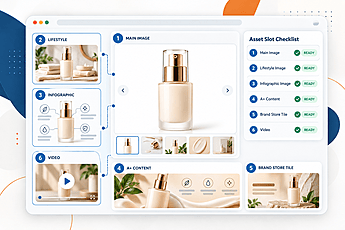
Amazon listing creative asset slots โ€” main image, lifestyle, infographic, A+ content, brand store tile and video โ€” with a ready checklist
Every slot on one listing, marked ready only after its check.

Get a Free Listing Creative Review

Slot map for one ASIN ยท Brief before design ยท Six rule checks before upload

No click, conversion or ranking promises ยท Reply within 1 business day

A listing page as a set of numbered slots, each shown with its asset type. Illustrative. No brand names and no finished work are shown.

What every Amazon creative project includes

  • A slot map per ASIN, from the main image to the listing video
  • A brief before design: claims, keyword and buyer question agreed first
  • Six rule checks on every asset, at mobile size too, before upload
  • Final files, source files and the approval record, owned by you
  • Each asset mapped to its slot
  • Rule-checked before upload
  • Creative only or full service

The starting point

Why Does Amazon Creative Need Its Own Brief?

An Amazon creative agency has to start from the listing, because the listing decides where each image goes. A generic brand design can look right on its own and still fail in the slot it lands in. The same image can read clearly in a gallery and be unreadable as a thumbnail, or pass one rule set and fail another.

  • Slots come first. The shopper sees the main image, then the gallery, then the A+ modules. Each one answers a different question at a different moment on the page.
  • Claims come from the listing. The brief lists the claims, the keyword and the buyer question before any layout is drawn. A visual that makes a claim the listing does not make is removed at the brief.
  • Rules differ by slot. A main image, a gallery image and an A+ module each have their own rules, so the check runs slot by slot and not once for the whole set.

Good Amazon product creative is planned from the listing outward, not made as a set of pictures. The result is a set of assets that agree with each other, with the copy and with the keyword. Buyers rarely need more images. They need the right image in the right order for the question the shopper is asking at that point.

A worked example makes the point. Take a product with three claims: it is easy to clean, it is sold in two sizes, and it comes with a care guide. The main image shows the product and nothing else. The first gallery image shows the easy clean. The second shows the two sizes side by side. The care guide moves to an A+ module, where there is room to explain it. Each claim has one slot, and none is repeated in a place where it does not belong.

Not this service when: the listing already has a complete image set and A+ modules that pass the checks. Then a creative review comes before any new work, and the review says which parts already work.

Amazon's own tools

What Do Amazon's Own Tools Offer, and Where Do They Stop?

Amazon provides tools that help with listing content and testing. They are useful, and they have limits that matter for creative work.

Manage Your Experiments lets eligible brands test images and A+ copy against the original. Eligibility and setup depend on the account, so we confirm them before a test is planned, not after.

A+ Content and Brand Store need Brand Registry. Where the account is eligible, these surfaces are open to the brand. Where it is not, the work is planned for the surfaces that are open, and the gap is stated at the audit.

Amazon's rules set what each image can contain, and the upload checks apply them. The tools do not brief a design, map an asset to its slot, or decide which claim belongs on which image. That work sits between the listing and the upload, and it is the part a creative service adds.


Amazon's own tools and our service, side by side
Part of the workAmazon's toolsOur service
Slot mappingNot part of the toolsEach asset mapped to its Amazon slot
Brief per ASINNot part of the toolsClaims, keyword and buyer question agreed first
Rule check before uploadUpload checks against Amazon's rulesChecks run per slot before upload, with a record
Surface-specific checksSet by Amazon for each surfaceChecked against each surface's rules, at mobile size too
Measurement with eligible testsExperiment tools, where the account is eligibleTests planned and read against an agreed period

The slot map

Which Amazon Slot Does Each Asset Fill?

Each Amazon surface has a job, and each asset has a place. The table below is the working map for a listing. The numbers match the slots in the graphic at the top of this page.

Owners are named by role. Design builds the asset, and a separate rule check reads it before upload. The same person does not both build and approve an asset, so the check stays independent of the design.

Amazon surfaces, the asset for each, its rule set and who owns it
SlotAssetRule setOwner
1Main imageAmazon's main image rules, checked before uploadDesign, then rule check
2Gallery imagesAmazon's gallery rules, with text legible at mobile sizeDesign, then rule check
3InfographicClaims matched to the listing, with text legible at mobile sizeBrief, then claim check
4A+ module visualModule size and text limits for each module typeVisual by us; module copy by the A+ service
5Brand Store tileTile size and link target for the StoreDesign, then build with the Store service
6Listing videoVideo specs and captions, verified before publishStoryboard and edit; filming with a partner

Read down the table and the shopper's path shows. The main image makes the first decision, whether to click. The gallery answers the questions that follow. The infographic carries claims that need more room. The A+ module and Store tile carry the longer story, and the video is the last slot, for a shopper who wants to see the product move.

The rule sets in the third column are read against Amazon's current help pages on the day of the check. No size or limit is stated here until it has been verified, and the check sheet records the source it was read from.

What we make

What Do We Make, and What Do We Route Out?

The service covers the visual assets that sell on a detail page or a brand page. Amazon creative services only work when each piece is built for its place, so the list below is the scope. Six cards set out what we make, and where some of the work goes to another service.

  1. Listing image set

    The main image layout and the gallery images behind it, built to the rules of each slot.

  2. Infographics

    Feature callouts and comparison graphics for the gallery, with the text checked against the listing's claims.

  3. A+ visuals

    Layout, image set and graphic elements for each A+ module. The module copy is written by the A+ service.

    Module copy: A+ content service
  4. Brand Store tiles

    Tile visuals and the visual system for the Store, where the brand has one or is adding one.

    Store build: Store set-up service
  5. Listing video

    Storyboard, edit and cut-downs from the client's footage. Filming is routed to a partner.

    Filming: partner
  6. Brief and surface map

    The claims, keyword, buyer question and slot map for each ASIN, agreed before any design starts.

Some work sits with other services, and we link to them rather than repeat them. Product photography and image editing sit with the photography service. Listing copy sits with the listing service. Sponsored ads creative sits with advertising management.

Each card names the slot it serves. A brief that touches three cards is handled as one piece of work, so the infographic and the A+ visual do not repeat the same claim in two places with different wording.

Each asset needs a specific set of facts from the brief before design starts. A main image needs the product, the angle, the colour and the rule set for its slot. A gallery image needs one claim and the question it answers. An infographic needs its claims in order, the source for each, and text that holds at mobile size. An A+ visual needs the module type and the copy it sits beside. A Store tile needs the Store layout and the link it points to. A video needs the storyboard, the footage, the captions and the cut lengths each placement requires.

Not this service when: the only need is ad creative for campaigns. Then the advertising management service is the right route, and it plans the creative with the bids.

Two routes

Creative Only or Full Service: How Do You Choose?

There are two ways to buy this work. The right one depends on who uploads, who runs the advertising and who owns the listing copy. Neither route is the better choice in every case.

Creative only

Files for your team to upload

We deliver the finished files, the slot map and the approval record. Your team or your partner uploads the assets and runs the listing. This route suits a brand whose listing and advertising teams already work well together.

Full service

Creative inside the account plan

The creative sits with the account and advertising team, so the images, the copy and the bids are planned together. The full-service route is described on its own page.

See the full-service page

Three questions decide it.

  • Who uploads the files? If your team does, creative only is likely to fit. If the upload needs to sit with the account team, full service fits better.
  • Who runs the advertising? If an existing agency or your own team runs the campaigns, the creative can be handed over. If no one does, the full-service route keeps the creative and the campaigns on one plan.
  • Who owns the listing copy? If the copy is settled, the creative follows it. If the copy is still open, the brief has to start from the copy first.

A worked case helps. Take a brand whose advertising is run by an outside agency, and whose listing team uploads its own pages. Creative only fits that brand: the files, the slot map and the approval record go to the listing team, and the advertising agency keeps its own plan. A brand with no advertising team and a thin listing team is the opposite case, and full service fits it better.

The choice can change later. A creative only project can move to full service once the account plan is ready, and the slot map and the approval record carry across without rework.

Before upload

How Is Each Asset Checked Before Upload?

Every asset goes through the same six checks before it is uploaded or delivered. Each check has a number, so a failed check can be found and fixed.

  1. 1

    Main image rules

    White background, product fill, and no text, logos or props, as Amazon sets them for the main image.

  2. 2

    Gallery and infographic text

    Legible at mobile size. Every claim in the text matched to the listing.

  3. 3

    A+ module limits

    Size and text limits for each module type, checked before publish.

  4. 4

    Brand Store tile sizes

    Tile sizes and link targets for the Store, checked against the Store's own layout.

  5. 5

    Video specs and captions

    Format, length and captions, checked before publish.

  6. 6

    Claims, units and numbers

    Every claim, unit and number matched to the source listing.

Rules change, so the limits are read from Amazon's own help pages on the day of the check, and not from memory or from a copy of an old rule sheet. A failed check is logged with its number and fixed before the asset moves on.

On a phone, the main image is seen at a small size, so the check looks at the image at that size as well as at full size. Text that reads well on a large screen can be unreadable as a thumbnail, and the check catches that before upload.

Disclosure

How Do We Use AI in Images, and What Do We Disclose?

AI tools can help with layout, backgrounds and draft visuals. We state where they are used, and we disclose it in the notes that travel with each file.

  • People. Generated people carry Amazon's synthetic-performer metadata tag where Amazon requires it. The effective date that applies is checked before the file is uploaded.
  • Products. A generated product image is never presented as a photograph of the real product.
  • Notes. A disclosure note travels with each file that uses generated content, so the client and the store team can see what was generated.
  • Checks. AI does not replace the brief, the slot map or the rule check. Each still runs on every asset, generated or not.

We think the disclosure should be as plain as the rest of the copy. A client should be able to tell, from the file notes alone, which parts of an image were made by a person and which were generated.

Not this service when: a client asks for generated images with no disclosure. We do not produce those.

How a project runs

How Does a Creative Project Run?

Each project follows six steps. The client sees the output of each step before the next one starts.

  1. Audit and surface map

    The listing, the images, the A+ and Store status, and the Brand Registry status.

    Output: slot map
  2. Brief

    Claims, keyword, buyer question and image order for each ASIN.

    Output: brief per ASIN
  3. Concept

    Layout options for the main image, gallery, infographics, A+ visuals and Store tiles.

    Output: concept set
  4. Build

    Final files at the required sizes and formats.

    Output: finished files
  5. Rule check

    Slot rules, mobile legibility and claims matched to the listing.

    Output: check results
  6. Approval and delivery

    One revision round, then upload where access is granted, or delivery of files.

    Output: approved files

A brief is the document everything else depends on, so it is written before any design starts. It holds the claims in the order the shopper meets them, the keyword and the buyer question, the slot each claim goes to, and the source each claim is read from. A design that cannot be traced back to the brief is sent back before it reaches the rule check.

A brief holds:

  • The claims, in the order the shopper meets them.
  • The keyword and the buyer question.
  • The slot each claim goes to, and the source it is read from.
  • The text limits at mobile size.
  • The product facts, and anything that must not be shown.
  • The brand rights for any name or logo in the creative.

Projects can start at a later step when the earlier work already exists. The audit records which steps were skipped and why, so the file shows what was reused.

After the change

How Do We Measure a Creative Change Before We Roll It Out?

A creative change is tested on one ASIN before the range moves. The test is set up and read against a period agreed at the start, so the result is not chosen after the fact.

  1. Plan the test

    Choose one ASIN and one change. Write the question the test answers before it starts, and agree the period it runs for.

  2. Use the tools where eligible

    Amazon's experiment tools are used where the account is eligible. Where it is not, the change is read against the period before, and the limits of that read are stated.

  3. Read the result

    Results are reported as found, including results that do not support the change. A flat result is reported as flat.

A useful read names the change, the ASIN, the period and the measure before the test starts. It also names what a flat result would look like, so a flat result is not explained away later. Where traffic is too low for a clear read, the report says so, and a short period is not stretched into a verdict.

We do not promise a click, a conversion or a ranking change. We report what the test shows, and we say what it does not show. A single ASIN and a short period cannot prove a change works across a range, so the next step is always a decision made with the data in hand.

Files and after launch

Who Owns the Files, and What Happens After Launch?

  1. The files

    The client owns the final files. Source files and the approval record are delivered with them, in the agreed formats.

  2. Upload or delivery

    We upload only where the client grants access. Otherwise the files are delivered, and the client's team uploads them.

One revision round per asset is included before approval.

The approval record is the file that answers later questions. It lists each asset, its slot, the check it passed, the revision made, and the person who approved it. A question about one image can be answered from that record without rebuilding the set.

After launch, assets are reviewed when the listing or the product changes. No automatic refresh is promised. A review is briefed, built and checked the same way as the first set, and it starts from the approval record rather than from memory.

Why us

Why GrowithAmazon for Amazon Creative

We work on listing copy, A+ content, product photography, Brand Store set-up, advertising and account management. Creative is planned alongside the rest of the listing, so the images, the copy and the keyword agree with one another.

  • Planned with the listing

    The brief uses the same claims and keyword as the copy.

  • Checked per slot

    Each asset is checked against the rules of the slot it fills.

  • Clear routes

    Creative only or full service, chosen at the start.

  • Plain reporting

    Test results are reported as found.

  • Consent first

    Client stories and samples are shown only with written consent.

No figures appear on this page until they are confirmed against our own records.

Questions

Frequently Asked Questions

What does an Amazon creative agency do?

An Amazon creative agency makes the visual assets that sit on a listing and a brand page: the main image, the gallery, infographics, A+ visuals, Brand Store tiles and listing video. Each asset is briefed to a slot and checked against that slot's rules before upload.

Can I buy creative without account management?

Yes. The creative only route delivers finished files, the slot map and the approval record. Your team or your partner uploads the assets and runs the listing. Both routes start from the same brief, so switching later does not mean starting again. The full-service route is described on its own page.

Which assets do you make for Amazon?

The default scope is listing images, infographics, A+ visuals, Brand Store tiles, and listing video storyboarded and edited from client footage. Listing copy, photography, Store build and ad creative sit with their own services, and we link to them.

Do you make Sponsored Brands and Sponsored Display creative?

Not in the default scope. Ad creative is routed to the advertising management service, which plans it alongside the bids and the campaign structure.

Do you use AI-generated images?

Sometimes, for layout, backgrounds and draft visuals. Each file that uses generated content carries a disclosure note. Generated people carry Amazon's synthetic-performer tag where it applies, and a generated product image is never shown as a photograph.

How do you check images against Amazon's rules?

Each asset goes through six checks before upload. They cover the main image rules, gallery and infographic text, A+ module limits, Brand Store tile sizes, video specs and claims. The limits are read from Amazon's own help pages on the day of the check. A failed check is logged and fixed before the asset moves on.

Do you write A+ copy?

A+ module copy sits with our A+ content service. We design the visual layout and the image set for each module, and the copy is written and checked in that service before upload.

Who owns the files?

The client owns the final files. Source files and the approval record come with them. Assets are reviewed when the listing or product changes, and that review is briefed and checked the same way as the first set.

How many revision rounds are included?

One revision round per asset before approval is the default. Any further rounds are agreed before the work starts, so the scope is clear from the first day.

How do you measure whether a creative change worked?

A change is tested on one ASIN before the range moves, using Amazon's experiment tools where the account is eligible. We report what the test shows, including results that do not support the change.

Next step

What's the Next Step?

Send us the current listing, its images and the slots that matter most. We will show you the slot map for one ASIN, so you can see the plan before anything is built. Start with one product.

A listing creative review covers:

  • The slot map for one ASIN, from the main image to the listing video.
  • The claims, keyword and buyer question the brief would start from.
  • Which assets already pass the checks, and which parts already work.
  • Whether creative only or full service fits the way your team works.

Both routes start from the same brief, so switching later does not mean starting again.

Request Your Listing Creative Review

Send one ASIN and the slots that matter most. We return the slot map for that ASIN before anything is built.

No fixed package ยท No result promised ยท No spam